

Running mining hardware without a properly configured node is where many home setups start to feel unreliable. A solid bitcoin mining node setup guide is not just about getting a box online - it is about reducing friction between your miner, your network and the Bitcoin blockchain so your equipment works as expected from day one.
What a mining node actually does
A Bitcoin node verifies blocks and transactions against the network rules. It does not mine by itself unless you pair it with mining hardware or mining software, but it provides the trusted blockchain data your setup depends on. If you are using a solo miner, a pool-compatible device or a small ASIC installation at home, the node acts as the reference point that tells your equipment what is valid.
That matters for two reasons. First, you are not relying entirely on a third party for blockchain validation. Second, you gain more control over privacy, monitoring and troubleshooting. For buyers looking at dedicated mining hardware, a pre-configured node can save time, but it is still useful to understand what sits behind the setup.
Bitcoin mining node setup guide: choose the right hardware
The best hardware choice depends on whether you want a low-maintenance home unit or something with more room for expansion. A node does not need ASIC-level power, but it does need stable components. The usual baseline is a compact computer or mini PC, at least 8GB of RAM, a modern processor, and a solid-state drive with enough capacity for the Bitcoin blockchain and future growth.
Storage is the first place where buyers often cut corners. That usually creates problems later. A full node should be paired with an SSD rather than an older hard drive, because blockchain validation and indexing are much smoother on flash storage. For most users, 2TB gives sensible headroom. A smaller drive may work initially, but you are building in an upgrade sooner than necessary.
Network connection matters as much as compute. A wired Ethernet connection is preferable to Wi-Fi, especially if the node is expected to support mining hardware continuously. Wireless can work, but it adds another variable when diagnosing stale shares, interrupted connections or slow sync times.
Power reliability is also worth considering. If you are running a home mining environment in the UK, a small uninterruptible power supply can help avoid corrupt shutdowns during brief outages. It is not mandatory for every setup, but it is a sensible layer if your node and miners are expected to run around the clock.
Software and operating system choices
Most miners setting up a node will choose between a standard Linux installation, a dedicated node operating system, or a pre-installed unit. Linux remains the most flexible route for technically confident users. It gives you full control over Bitcoin Core, firewall rules, remote access and storage configuration.
A dedicated node OS is simpler and better suited to buyers who want a guided interface. These systems tend to reduce setup time and make common tasks easier, such as monitoring sync progress, managing services and viewing logs. The trade-off is that you may have fewer options for customisation.
Pre-configured hardware sits at the most convenient end of the scale. This is often the right fit for buyers who want mining-specific infrastructure without spending hours on initial configuration. It costs more than building from spare parts, but it can reduce setup errors and shorten the path to an operational miner.
Syncing the blockchain takes time
The first sync is the part many people underestimate. A full Bitcoin node needs to download and verify the blockchain from the beginning. Depending on hardware, broadband speed and system configuration, this can take many hours or several days.
That does not mean something is wrong. Verification is CPU, storage and network intensive. If the drive is too slow, the process drags. If the machine is underpowered, initial sync becomes frustrating. If your internet connection has strict limits or unstable performance, the whole process becomes less predictable.
This is why hardware selection affects user experience more than the headline price suggests. Saving a small amount on storage or processing can cost a lot of time later.
Bitcoin mining node setup guide: network and miner connection
Once the node is synced, the next step is connecting your mining hardware. The exact process depends on whether you are running solo mining software, a pool proxy, or a dedicated mining node environment that already includes management tools.
At a basic level, your miner needs a reliable path to the node or the services running alongside it. That usually means confirming local IP addressing, checking that the required ports are open on the local firewall, and making sure your router is not introducing unnecessary instability. For a home setup, keeping the node and miner on the same wired network segment is usually the cleanest option.
It is worth being realistic here. A node alone does not magically turn any miner into an efficient solo mining machine. Solo mining remains a high-variance approach. For hobbyist users, it may be attractive for independence or learning, but expected returns differ significantly from pool mining. Your setup should reflect your goals rather than internet folklore.
Security is not optional
A mining node should not be treated like a casual desktop device. Even if it does not hold large wallet balances, it still sits inside your network and often runs services that should be protected. Start with basic account hygiene: strong passwords, restricted remote login, software updates and a firewall configured with intention rather than guesswork.
Remote access is useful, but exposing services directly to the internet without understanding the risks is a mistake. If you need off-site management, a VPN-based approach is usually cleaner than opening public access unnecessarily. Physical security matters too. If the node sits near miners in a warm, dusty environment, make sure airflow and dust control are part of the plan.
Backups deserve attention. Configuration files, wallet data if applicable, and recovery details should be stored safely. A node can be rebuilt, but losing access credentials or wallet information creates avoidable downtime and risk.
Common setup mistakes
The most common problem is mismatched expectations. Some buyers expect a mining node to behave like plug-and-play consumer electronics. In reality, even well-prepared hardware still depends on broadband quality, local network stability and proper miner configuration.
Another frequent issue is underspecifying storage. Cheap drives, nearly full disks and ageing hard drives are behind many slow or unstable nodes. Heat is another culprit. Small enclosures with poor ventilation may look tidy, but they can throttle under continuous use.
There is also the question of support. If you are comfortable with command-line administration, self-built can be cost-effective. If you are not, buying dedicated, mining-oriented hardware can be the more efficient decision, even if the upfront cost is higher. Time has a cost, and so does downtime.
Should you build or buy pre-configured?
For technically capable users, building a node offers flexibility and often lower raw hardware cost. You choose the components, the operating system and the maintenance schedule. That suits users who already run home labs or have previous Linux experience.
For many miners, though, buying a pre-installed node is the better commercial decision. It reduces uncertainty, shortens deployment time and provides a clearer support path if something does not behave as expected. That is especially relevant for buyers adding a node to a wider hardware order and wanting fewer moving parts during installation.
A specialist retailer such as Ehasher is relevant here because mining-specific hardware support is different from generic electronics support. The practical value is not just the box itself, but the fact that the product is sold in the context of actual mining use.
What to check before you buy
Before purchasing hardware for a node, confirm four things. Make sure the storage capacity is realistic for a full Bitcoin node, check that the device is intended for continuous operation, verify whether it is pre-configured or requires manual installation, and be clear about how it will fit into your existing miner and network setup.
It also helps to ask whether you want simplicity or control. If you want a dependable unit with less setup friction, pre-configured usually wins. If you want to customise every layer, self-build makes more sense. Neither option is universally better. It depends on your skill level, your time, and how much trial and error you are willing to absorb.
A well-chosen node will not make weak mining economics disappear, but it does remove a lot of unnecessary friction from operating Bitcoin hardware properly. If your aim is a cleaner home setup, better validation control and fewer avoidable support issues, starting with the right node is money spent in the right place.
Related Product
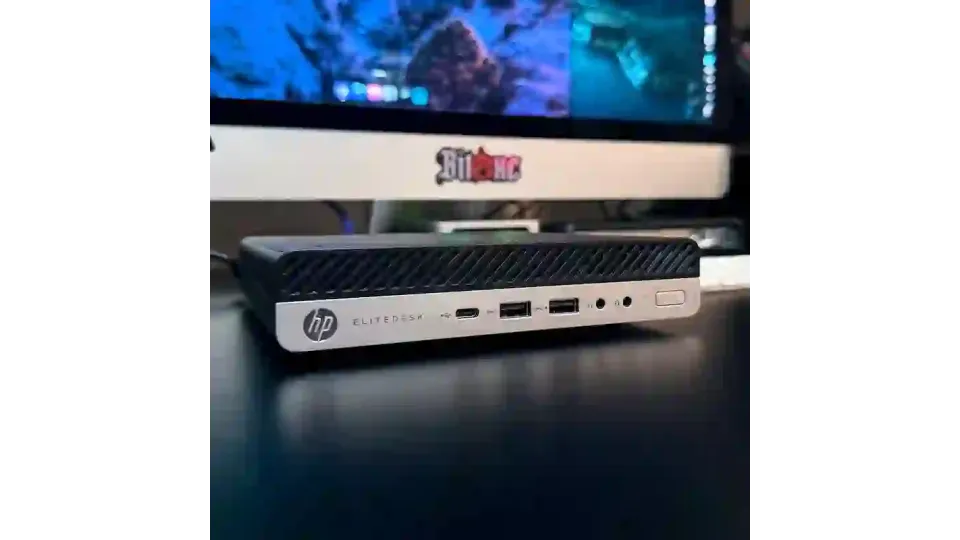
HP EliteDesk 705 G4 Mini PC – 16GB Ram - 256GB SSD NVMe – 5tratumOS Multi-Chain Node
HP EliteDesk 705 G4 Mini PC – 5tratumOS Multi-Chain Node (256GB SSD) Condition: Used – fully tested and prepared. May show minor cosmetic wear...
£149.95
HP EliteDesk 705 G4 Mini PC – 16GB 1TB NVMe – 5tratumOS Multi-Chain Node
HP EliteDesk 705 G4 Mini PC – 5tratumOS Multi-Chain Node (1TB NVMe) Condition: Used – fully tested and prepared. May show minor cosmetic wear. ..
£299.95
HP EliteDesk 800 G3 Mini PC – i5-7500T 16GB 1TB NVMe – 5tratumOS Multi-Chain Node
🏖️ HOLIDAY NOTICE Please note that eHasher will be taking a short break from 5pm Wednesday 2 September until 9am Tuesday 15 September 2026 (UK t..
£329.95